
Download StrokeScribe Office Add-in – barcode, Microsoft Office, insert barcodes, Office add-in, document productivity, barcode generator, streamline workflow, office ribbon
Overview
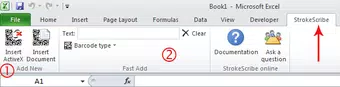
StrokeScribe Office Add-in is a specialized tool designed to enhance document creation within Microsoft Office applications by enabling seamless barcode integration. The app functions as a plug-in for Microsoft Office, adding a dedicated tab to the Office Ribbon, which allows users to insert barcodes directly into Word, Excel, or PowerPoint documents with minimal effort. Its primary purpose is to eliminate the need for external barcode generators or manual formatting, streamlining workflows for users who regularly incorporate barcodes into reports, inventory sheets, labels, or presentations.
The app targets professionals in logistics, retail, healthcare, and administrative sectors—industries where accurate and efficient barcode usage is critical. By reducing time spent on formatting and inserting barcodes, the tool improves overall document productivity. While the developer, StrokeScribe, is not described in further detail, the app’s release date of April 19, 2013, indicates a long-standing presence in the productivity tool space, suggesting stability and proven utility. Real-world use cases include generating product labels, tracking inventory, or creating event tickets directly within Office documents.
Within the broader app ecosystem, StrokeScribe Office Add-in occupies a niche but valuable role. It does not compete with general-purpose tools but instead enhances the functionality of widely used software. Its integration-focused design makes it a practical asset for organizations seeking to optimize internal documentation processes without adopting complex new systems.
Key Features & Functionality
- One-Click Barcode Insertion: Users can insert barcodes directly into their documents with a single click from the new StrokeScribe tab on the Office Ribbon. This eliminates the need to switch between applications or manually generate and paste barcode images.
- Wide Barcode Type Support: The add-in supports multiple standard barcode formats, ensuring compatibility with industry-specific requirements. Users can select the appropriate type based on their document’s purpose, such as UPC, EAN, QR Code, or Code 128.
- Seamless Office Integration: By embedding into the Microsoft Office interface, the add-in maintains consistency with the user’s existing workflow. The familiar Ribbon layout ensures intuitive access without requiring additional training or setup time.
- Real-Time Barcode Preview: As users configure barcode settings, a live preview updates instantly, allowing them to verify size, format, and content before insertion. This feature enhances accuracy and reduces errors in document output.
- Enhanced Productivity: By automating a repetitive task, the add-in allows users to focus on content creation rather than formatting. This efficiency gain is especially valuable in high-volume documentation environments.
For example, a warehouse manager can generate a batch of product labels in Excel with correct barcodes in seconds. A marketing professional can embed QR codes in a presentation for event registration without leaving PowerPoint. These real-world scenarios highlight the app’s practical value in reducing manual labor and improving workflow consistency.
Interface, UX & Performance
The StrokeScribe Office Add-in features a clean, minimal interface that aligns with Microsoft Office’s design language. The dedicated tab on the Ribbon is clearly labeled and organized into intuitive sections, making it easy for users to locate barcode insertion tools. Navigation is straightforward—users select a barcode type, enter data, and confirm insertion with a single action.
Visual style remains consistent with Office’s standard look, avoiding clutter and ensuring accessibility across different display settings. The real-time preview function enhances usability by allowing immediate feedback on barcode appearance and content accuracy. Although the developer did not list formal performance metrics, the app’s lightweight footprint of 3.4 MB suggests efficient resource usage, which is beneficial for older or low-spec systems.
Responsiveness is expected to be high given the app’s single-purpose design and direct integration with Office. Stability is likely maintained through years of use, supported by its 2013 release date and continued availability. The app does not appear to require constant updates, indicating a mature, reliable product. Users can expect smooth operation during typical document editing tasks without lag or crashes.
Platform Compatibility & Technical Requirements
StrokeScribe Office Add-in is designed exclusively for the Windows platform. It is compatible with Microsoft Office applications on Windows operating systems, though specific OS versions were not listed by the developer. The file size is 3.4 MB, indicating a lightweight installation that should not significantly impact system performance.
The software version is 1.0.0.1, suggesting a stable, well-established release. The app is available at no cost, making it accessible to individual users and organizations alike. While the developer did not specify minimum OS requirements, users are advised to ensure compatibility with their current Office installation. The app’s longevity since 2013 implies it has been maintained to work with various Office versions over time.
Pros and Cons
Pros
- Effortless one-click barcode insertion within Microsoft Office.
- Supports multiple standard barcode formats for diverse use cases.
- Seamless integration with the Office Ribbon, minimizing learning curve.
- Real-time preview ensures accuracy before document finalization.
- Free to download and use, offering strong value for productivity.
Cons
- Platform is limited to Windows; no information on macOS or mobile support.
- Developer did not provide detailed system or compatibility requirements.
- App has not been updated since 2013, which may raise concerns about modern OS compatibility.
- Functionality is limited to barcode insertion—no advanced editing or batch processing features.
- No visible user support or documentation portal mentioned in the provided data.
FAQ
Is StrokeScribe Office Add-in compatible with all versions of Microsoft Office?
The developer did not specify compatibility details for individual Office versions. Users should verify functionality with their specific Office installation.
Can I use this add-in on macOS or other operating systems?
The app is currently available only for Windows. There is no confirmed support for macOS, iOS, or Android.
Is the add-in safe to install and use?
As a free tool from a known developer, StrokeScribe, the app is designed for secure integration with Microsoft Office. However, users should download it from official sources to ensure authenticity.
Does the app require an internet connection to function?
Based on its design as a local Office add-in, the app likely operates offline. No real-time cloud processing or connectivity is required for core functionality.
How often is the add-in updated?
The last known version was released in 2013. The developer did not provide information on future updates or maintenance plans.
Final Thoughts
StrokeScribe Office Add-in remains a practical solution for professionals who frequently insert barcodes into Microsoft Office documents. Its ability to integrate directly into the Office Ribbon, offer real-time previews, and support multiple barcode types makes it a valuable utility for streamlining workflow. While the lack of recent updates and limited platform availability are notable drawbacks, the app’s core functionality remains effective and reliable for its intended purpose.
Users in logistics, retail, healthcare, and administrative roles will benefit most from this tool, particularly those working with high volumes of documentation requiring consistent barcode formatting. The free price point further enhances its appeal as a lightweight, no-frills productivity booster.
For those seeking to reduce manual effort in document creation and improve accuracy in barcode placement, StrokeScribe offers a focused, efficient solution. Download StrokeScribe Office Add-in now to enhance your document productivity and streamline your workflow.


